tTorrent Pro
tTorrent is simply the best torrent (P2P) downloader client for
Android based devices. Download large files like free movies, free music
albums, free software programs, free MP3 files and other entertainment
media to your phone or tablet very fast. High Speed Internet connection
(Wi-Fi, 4G) as you wish! Features:
UNLIMITED DOWNLOAD SPEED!
easy search for torrents with the optional plugin
create and share new torrent files
choose single files for download from torrents containing multiple files
sequential download mode (streaming)
Wifi only mode, Wifi or WiMAX mode
magnet link support, trackerless torrent (DHT) support
RSS support(automatically download torrents published in feeds)
UPnP and NAT-PMP support
IP filtering support
proxy support (SOCKS, HTTP)
encryption
Local Peer Discovery
Web interface (also supports Transdroid as a remote controller)
Label support (with custom save path)
SeriesGuide search Extension
Mod Info (Credits : zealot01)
User-Agent and changed the peer_id client (uTorrent imitation)
Removed in the menu “share with a friend”
Turned off Exchange trackers
How to Install :
Save the downloaded .apk on your android phone’s SD card
Rom Toolbox Pro ROM Toolbox is THE MUST HAVE APP for every root user. ROM Toolbox combines all the great root apps into one monster app with a beautiful and easy to use interface. ROM Toolbox has every tool you need to make your Android device fast and customized to your liking. Save 85% by getting ROM Toolbox instead of spending $30 or more on other apps. ROM Toolbox has been featured on LifeHacker, XDA-Developers, Droid-Life, Android Central, RootzWiki, Android Police, and other popular sites. We know you will love it; Over 14,000 people gave it a full 5 star review! ★★★★★ This app requires root permission. For fast and friendly support please email us at jrummy.apps@gmail.com. We will be glad to help answer your questions or concerns. ROM Toolbox combines apps like Titanium Backup, ROM Manager, Root Explorer, SetCPU, MetaMorph, Autorun Manager, Terminal Emulator, Script Manager, SD Booster, BuildProp Editor, Font Installer, Boot Animation Installer & many more apps into an all-in-one app! Here is a list of some of the features you will find: ROM Management
Install ROMs & themes from a growing list of ROMs. AOKP, CyanogenMod and other popular ROMs included.
Create, manage & restore nandroid backups
Wipe data, cache, dalvik-cache, battery stats
Install multiple ROMs & ZIPs from your SD card
App Manager
Batch backup & restore apps and their data
Schedule backups to run at a certain time
Restore apps from nandroid backups
Backup/Restore text messages, bookmarks, accounts, etc.
Backup your apps to dropbox
Freeze/Defrost system & user apps
Backup/restore Android Market link
Task manager
Automated batch uninstaller
E-mail your apps to friends
Move any user app to the SD card
Clean up dalvik-cache
Zipalign, fix permissions, wipe data & cache, force close any app
Root Explorer
Access the whole of android’s file system (including the elusive data folder!).
Batch copy/paste, zip, tar, delete, move any file or folder
Change file permissions and ownership
View, edit & share files
File manager with two panels for easier management
Scripter & Terminal Emulator
Create and run scripts as root
Set your scripts to run at-boot
Auto Start Manager
Enable/disable apps that run on start-up
Enable/disable any broadcast receiver, activity or service
Rebooter
Reboot recovery, powerdown, bootloader, etc.
Font Installer
Install custom fonts from a huge list or from your sdcard
Set fonts as favorites & send them to friends
Boot Animation Installer
Install custom boot animations from a huge collection or from your sdcard
Preview boot animations
Create a boot animation from a GIF file
Have a new random boot animation each time you boot-up!
Theme Manager & Statusbar Icon Changer
Create and install full themes
Customize your status bar by installing custom icons for wifi, signal, gps, etc.
Change your battery icons in the status bar to a custom one from a list of 200+
Boot Logo Changer
Change your boot logo for supported phones
Theme Chooser Themes
View a list of themes for the TMobile Theme Chooser
Ampere Pro v1.42.4 Did you ever before really felt, that Charger/USB cord collection charges your gadget truly fast as well as the other not? Now, you can prove this with Ampere. Measure the asking for as well as discharging current of your battery. The application works with Android 4.0.3+ gadgets. Not every device is supported since there are gadgets which does not have an appropriate dimension chip (or the interface) as well as they can not be supported whatsoever. Kindly check out the list of not sustained phones at the end of the description. The app is not implied to be mA precise. It is just great for examine which Charger/USB wire combo is functioning the most effective for you on the very same tool. Begin the app and wait ca. 10 seconds (“assessing” is on the display screen). Hereafter time, the billing or releasing current will certainly be revealed. The present relies on several things :
The battery charger (USB/AC/Wireless).
The USB cable.
The phone kind.
Existing jobs running.
Display brightness.
WiFi state.
GPS state.
Kindly don’t utilize the readings on this app as concrete science. Nevertheless, the readings suffice to reasonably measure exactly how various wall chargers and USB cables fair on the same gadget. If your Lollipop gadget (or later) shows 0 continuously, kindly utilize the setups choice “Old measurement approach”. You could force the application with it to use the aged measurement interface, if the Lollipop device contends least one. Maybe it helps … Regrettably some Samsung gadgets do not offer proper (gauged) valuations (e.g.: S5), merely the maximum possible charging present with the actual USB cable/charger setup. This is a firmware problem. Concerning notification and background dimension :
The dimension operates in the background just if you activate the notice in the setups.
You can conceal the notification icon by establishing the notice priority to minimum.
Background info: The app gauges the charging/discharging current of the battery. If your phone is not attached to a charger, you see the releasing present which is negative. If you link a wall charger after that the present just what the wall charger presenteds with will certainly be made use of to supply your phone and the continuing to be operate will certainly be asked for into the electric battery.
If your phone eats 300 mA without a charger linked (-300 mA on the monitor), after that a 500 mA battery charger will bill your battery maximum with 200 mA existing (200mA on screen).
Technical details: The displayed current is an average valuation from 50 dimensions minus the 10 top worths as well as the 10 lower values. The presented current could be shaky or unsteady and even just no meanings, that the Android system gives such unpredictable values. Every company uses various electric battery types and various other equipment making it difficult to make precise results concerning your battery charger.
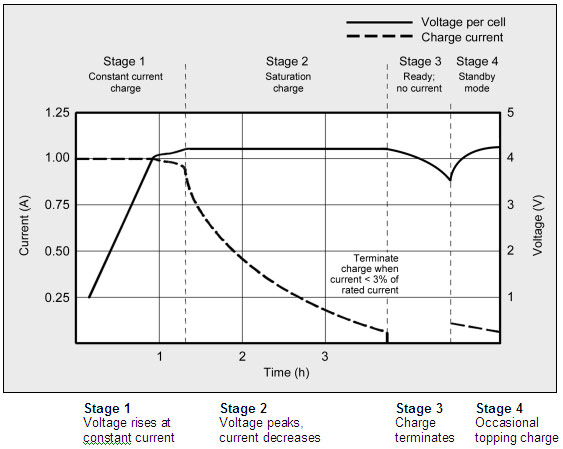
LiPo batteries do not draw the maximum for the full-time it takes to charge the phone. If your battery is billed nearly complete after that the charging current will certainly be a lot less as by lesser electric battery degrees. A graph explaining LiPo fee stages: http://batteryuniversity.com/_img/content/ion1.jpg. Dave’s (EEVBlog) LiPo Billing Tutorial: http://youtu.be/A6mKd5_-abk.
Phones/ROMS suitable only with “Aged measurement approach” switched on and selected the right “Measurement user interface”:. HTC One M7/ M8.
Phones/ROMS reported to be not collaborating with this app :
Please do not offer wrong ranking, if your phone is among the above. Not the application is wrong, but your phone does not sustain this kind of measurement yet. If the application does not work with your device with pre-Lollipop Android version, then kindly check out the initial and the second posts in this XDA designer forum thread: http://spam.com/pZqJg8. Please publish your trouble with screenshots in the XDA thread. WHAT ‘S NEW v1.42.4 Beta :
Settings restructured.
Establishing alternative for disabling reset switch.
Setting choice for straightforward notification.
StartOnBoot only if notification is allowed.
Swedish included.
Ukrainian included.
Greek, Polish remedied.
v1.42 :
Setting alternative “Beginning on Boot” added.
New languages: Azerbaijan, Hindi, Malay.
Bug repairs.
If the measured worth is constantly 0, kindly attempt to make use of the “Old measurement approach” and/or the “Measurement user interface” setups alternatives (if available).
GO SMS Pro GO SMS Pro 6 has been redesigned from start to finish, bringing you a brand new looking and intelligent mobile experience! GO SMS Pro – Nearly 100 Million users’ choice, all time #1 messaging app to replace the stock! It’s simple, intuitive, personalizing and fun! It comes with beautiful themes, lovely stickers, private box, GO chat (send free SMS & MMS) , pop up windows, dual sim support, and much more. We are committed to making GO SMS Pro faster, safer and tons of great features – messaging has never been so fun and efficient! Free Features
Hundreds of personalized themes and lovely stickers (keep increasing)
Private box to encrypt messages & protect your privacy
GO chat support for free messages and group chat
Sticky conversations help you focus on important contacts by sticking them at the top
Pop up new messages for quick viewing and replying
How to Root Any Android Device Without A PC / Computer. Welcome to the Onhax “How to Root” guide. Do you want to root your android device but couldn’t do so as you couldn’t understand the confusing process of rooting using your pc. Now You can. Onhax Google Guy presents, Root Your Android Device Without a PC / Computer. This guide will let you root high end devices like Samsung Galaxy S6, Sony Z3 and as well as low end like Asus Zenfone,Zte,Micromax and Motorolla. For those new to the world of rooting, root access is often used to install custom recoveries, which then can be used to flash custom ROMs, kernels, and other device modifications. Root access also enables users to install the powerful and versatile Xposed Framework, which itself acts as a gateway to easy, non-destructive device modification. But after rooting be sure to install a SuperUser app which allows root to only devices which you recognize and save you from harmfull apps. SuperUser – KingUser (To Unroot And Root) One such usefull superuser app is KingUser by KingxTeam.It is the best alternative to SuperSu..and that too with android L material Design Root your device using:
KINGROOT – One click root tool.
KingRoot is an amazing tool for “lazy people” who just want to get root access but don’t want to flash any third party Recovery into their lovely device. It is one of the most famous root tool in China and now we release English version here for everyone, totally free and without AD. FRAMAROOT – Root almost all devices.
Now you can root your android device without PC, just use framaroot. This app including several exploits named as the heroes of the book “The Lord of the Rings” Gandalf, Boromir, Pippin, Legolas, Sam, Frodo, Aragorn and Gimli. You can install Superuser and su binary on phone or tablet from android version 2.x to 4.x. TOWELROOT – If nothing works ..This will.
Created by Recognized Developer geohot, Towelroot is another root exploit app that is compatible with a large range of devices. The root exploit itself is built around Linux kernel CVE-2014-3153 discovered by hacker Pinkie Pie, and it involves an issue in the Futex subsystem that in turn allows for privilege escalation.So to sum it up..It ROOTS your device 😉 iRoot
iRoot has the advanced android root engine and secure android root technique make the success rate more than 90%. Now more than 150,000 devices from Android OS 2.2 to 4.4 are supported by iRoot. This number is still growing.
Z4Root
Another app for rooting your device without a computer…supports many number of devices. You will be master of your android phone with just one click to root or unroot your android phone! How to Install And Root ? (For all Apps)
Download the apks and install.
Open.
Do any one from below.
Kingroot – Click root..Done.
Framaroot – Choose Supersu and any character below…Done.
Lucky Patcher v5.9.3 Apk Lucky Patcher is a great Android tool to remove ads, modify Permissions, bypass premium applications license verification, and more. You can use this patches to break some apps Android Market License Verification or other verification To use this application, you need a rooted device. All credits to Chelpus.
NOTE: This app has No Ads
Changelog : v5.9.3
Update translations;
Update some custom patches;
Bugs fixed;
How to use it?
Download the given apk file
Install it and launch application and you will see all the applications explaining all types of apps
It will explain all the apps behaviour, either it has google ads, licence verification or any other restriction
Just apply path to it and you are done.
Important Notes ROOTING REQUIRED!
Stable functioning of Lucky Patcher can’t be guaranteed . So you are solely responsible for use of this application.
Under no circumstances On HAX will be responsible for any problems caused to your device (rebooting loop, unstable system, etc…)
The Room Three Continuing the story from The Room Two, your obsessive search for the Null results with being lured to ‘Grey Holm’, a mysterious mansion located on a remote island. You must use all your puzzle-solving abilities to navigate a series of trials devised by a mysterious figure known only as “The Craftsman”. The Room Three is significantly larger than our previous games, taking place in a variety of stunning new environments, each spanning multiple areas. New for The Room Three is the new eyepiece ability which allows you to explore the world in miniature, and also for the first time in The Room series you are able to return to Grey Holm between Chapters and solve its unique puzzles which will decide your fate and determine which of the alternate endings you will experience. How to install?
Download the given apk and data from the links below
KK Launcher Prime KK Launcher is the Top 1 Lollipop & KitKat style launcher; Most Fast, Cool, Powerful, and AD Free. KK Launcher target users
Who want latest Android experience, clean and modern design
Who want smooth operation, handy features
Who want their phones to be more powerful and playful
What make KK Launcher outstanding comparing to other launcher?
KK Launcher have 20+ unique,COOL and useful features: such as Sidebar, Super folder, Private folder, App Lock, Double tap to turn off screen.
Compare to Nova Launcher(or Apex Launcher,Solo Launcher), KK launcher base on KitKat, has latest Android UI and UE; while Nova Launcher base on ICS.
Compare to Google Now Launcher, KK launcher has all of its features, adding many useful features.
KK Launcher Main Features
Support icon theme: Find 5000+ of launcher icon pack from Google Play Store; compatible with themes of nova launcher,solo launcher,go launcher,apex launcher, etc KK Launcher also support color theme: Customize icons color, shape, mask, size as you want easily
Handy Sidebar: Include Memory cleaner; Quick toggle; Favorite apps, and Sidebar can be launched from everywhere
Highly customize: Have 300+ of launcher options to tune your devices; options for grid size, app folder, 4 UI size mode, dock pages …
Google Now on your home screen: From left-most home screen, swipe right to access Google Now cards that give you just the right information
Just say “Ok Google” When you’re on KK Launcher screens(Android 4.4+), just say “Ok Google” to trigger voice input, then say your command
Updating to Android 5.0, Lollipop: Keep updating to latest Android L Lollipop (Android 5.0), bring you the latest Android experience
Launcher Desktop: Smooth animation; Wallpaper scrolling; 16 transition effect; 5 live wallpaper effect; Color wallpaper
Candy Crush Soda Saga Candy Crush Soda Saga is the name of the new series of the popular game company, King.com, the creator of the game and introduced the world to build a new version of the game Candy Crush Soda Saga named ie the version of sodium.The pro version of the new characters and graphics are pretty high. Features
Stunning HD graphics and a very tasty!
Added the booster to help in the
Higher levels of
Characters and new interface in version Soda
Difficult and very challenging process
165 very exciting stage in the game
The game features a multiplayer and Sharing Experience
How To Login Into Facebook
Download The File to your card.
Uninstall / freeze Facebook.
Uninstall old version of the game.
Install the downloaded file, and connect to Facebook.
If you have any problem connecting Facebook, force stop game freeze/ uninstall Facebook then connect.
Quicker Quicker lets you put frequently used settings and shortcuts into a single place and access them from there quickly. It extends standard stock settings with better volume and brightness controls, as well as free memory indicators. Built in screen and LED flashlight make it even more useful. Switches:
Brightness (w/ Screen Dimmer for convenient usage of the phone in the darkness)
Ringer mode
Volume streams
Bluetooth
Wi-Fi
Portable Wi-Fi Hotspot*
GPS**
Mobile Data**
Call settings
Auto-sync
Screen timeout
Airplane mode
Auto rotation
Screen lock pattern
Indicators:
Battery
Free memory (internal, external)
App cache
Digital clock
Tools:
System shortcuts
Application shortcuts
Flashlight (screen and LED)
Others:
Battery indicator in status bar
Settings backup (configure once and restore at any time later)
Quick launch via status bar shortcut or by long-pressing hardware “search” button
Quicker uses following permissions:
Storage” for backup / restore feature
GPS location” for switching GPS on/off (see **)
Take picture & video” for LED flashlight
Directly call” for the shortcut widget when you adding a direct call shortcut
Reading log data” for being able to report issues
System tools” permissions for changing various system settings
How to install ?
Download and install the .apk from the link below.
Evernote is an easy-to-use, free app that helps you remember everything across all of the devices you use. Stay organized, save your ideas and improve productivity. Evernote lets you take notes, capture photos, create to-do lists, record voice reminders–and makes these notes completely searchable, whether you are at home, at work, or on the go. Key Features
Sync all of your notes across the computers and devices you use
Create and edit text notes, to-dos and task lists
Add handwriting and sketches to your notes Save, sync and share files
Search for text inside images
Organize notes by notebooks and tags
Email notes and save tweets to your Evernote account
Works with Evernote Business: Capture, browse, search, and share Business Notes and Business Notebooks from your smartphone or tablet.
Connect Evernote to other apps and products you use
Share notes with friends and colleagues via Facebook
What’s New
Bug fixes and miscellaneous improvements
Tell us how we’re doing! Rate the app
How to install ?
Download and install the .apk from the link below.
SnapTube – YouTube Downloader HD Video SnapTube – The downloader videos and music easier from YouTube. DOWNLOAD IN MULTIPLE RESOLUTIONS MP4 videos are available in resolutions: choose the small size of 360 pixels or the high-definition 720 pixels. DIRECT MP3 DOWNLOADS Download any YouTube music video directly as an MP3 file. No extra encoding process or plugin needed. Save space and listen to your favorite music video anytime you want. SEARCH VIDEOS WITH KEYWORDS Search a video with keywords. Easily find the exact video you want. DISCOVER NEW VIDEOS Explore videos in your favorite categories like Music and Movies. Discover new videos with recommended lists from our curators. MANAGE VIDEO DOWNLOADS Pause, cancel or resume a video download. Delete the videos you don’t need anymore. Manage all of your video downloads in one place. What’s in Mod
NO ADS
Clean design lets you focus on your videos. No annoying ads.
All-In-One Toolbox Pro (29 Tools) The best Android cleaner & memory booster All-In-One Toolbox, equipped with 29 Android system tools, is designed to clean up junk files, boost memory, protect private info and speedup your Android with one-tap cleaning and process killing. All-In-One Toolbox allows to batch uninstall unwanted apps, move apps to SD Card, disable running apps from system boot, manage files in SD Card and more… Key Features
Intuitive:Simple and clear UI design for easy and quick system optimization.
Thorough:Thorough and deep scanning of all the junk files(cache, residual, temp files etc.) and clean them out with just one-tap.
Versatile:29 tools into one pack to speed up system and extend battery life.
Multilingual:31 supported languages, easy and friendly to use.
Light:Small in size and no background service, consuming less memory and battery.
What does All-In-One Toolbox do?
Clean out junk files: Created in a simple method of seeing what’s taking up storage and reclaiming lost memory via smart and safe cleaning.
Delete SMS & Call logs
Erase browsing history
Remove Temp files
Clean SD card
Sweep out Apk leftover
Eliminate cache files
Make system run fast – process manager & boot speed up Kill running tasks whenever device slows down or freezes. Disable unwanted startup apps from system boot. Free up memory and keep Android device running at optimum speed.
One-tap boost under whitelist protection
Process manager with memory, battery and CPU consumption
Speed up boot and release system resources
Privacy protection – Provide access for you to erase your personal data and browsing traces to keep the privacy information from revealing. Pass-word service will lock the things you don’t want to share with others.
App locker
Browsing trace erasing
Call or SMS logs deleting
APP and File management – Check what’s on Android and provide a list of options for you to control files at your own will.
Uninstall system app
App to SD card
Batch installer/uninstaller
Zip and unzip
Backup and restore
Plenty of additional tools – 29+ system tools available in All-In-One Toolbox, all essential for your ease and wonderful Android experience.
Auto task plug-in: cache and junk file clean, silent mode, airplane mode and wifi management at set intervals automatically
Compass plug-in: give you direction when you are lost
Flashlight: light up your surroundings when it’s dark
QR and Barcode Scanner: quick scanning and info collecting
Game Booster: boost games to give you more fun
Android sensor box: show you all available sensors on your Android


 !
! 


 😉
😉